


As modern households become increasingly digital, more people are turning to network attached storage (NAS) as a convenient, centralised hub for files, photos, and media. One of the most common questions from Apple users is: “Can iPad access NAS storage?”
The short answer is yes. With recent improvements to iPadOS—including native support for SMB on iPad—connecting an iPad to a NAS drive has never been easier. Whether you want to stream movies, back up files, or manage a home media server, an iPad can work seamlessly with NAS over Wi-Fi.
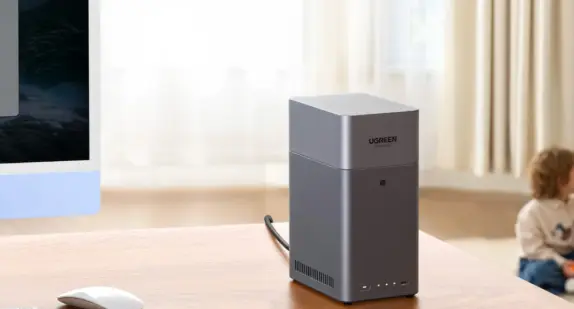
In this guide, we’ll walk you through exactly how an iPad connects to NAS storage, what you can do with it, and why the UGREEN NASync, including the UGREEN NASync DH2300, is an ideal choice for home users seeking a powerful yet user-friendly solution.
What Is NAS Storage?
Before diving into the iPad connection process, it’s important to understand what NAS storage is. A NAS device is a small, dedicated computer designed to store and serve files over your local network. Unlike a traditional external hard drive, which connects directly to a laptop, a NAS drive plugs into your router and becomes accessible to multiple devices at the same time.
This makes server NAS storage an excellent solution for:
- Home media streaming
- Backing up photos and documents
- File sharing across family members
- Storing large creative projects
- Remote access to files when travelling
In essence, NAS storage for home provides the convenience of cloud storage while keeping your files stored privately within your own home.
Can iPad Access NAS Storage?
Absolutely—modern iPads running iPadOS 13 or later support SMB (Server Message Block), the standard file-sharing protocol used by most NAS systems. This means your iPad can browse folders, open documents, stream videos, and even perform wireless backups directly to a NAS.
Users can connect via:
- SMB file sharing
- Native Files app
- NAS mobile apps (such as UGREEN NASync’s dedicated app)
- Web browser access
- Third-party apps like VLC, Infuse, or FileExplorer for advanced media streaming
This flexibility makes iPad NAS access straightforward for both beginners and power users.
How an iPad Connects to NAS: Clear Explanation
When your iPad and NAS device are on the same Wi-Fi network, the iPad can detect the NAS through the SMB protocol. Once the connection is established, the NAS appears in the Files app as a shared server—similar to how you would see a connected drive on a computer.
Behind the scenes:
- The NAS hosts your files on its internal drives.
- It shares them over the network via SMB.
- The iPad uses iPadOS’s built-in networking functions to authenticate and mount the shared folders.
- Once mounted, the iPad can read, write, stream, upload, or download files just like with any cloud service.
This simple yet powerful system enables smooth NAS over Wi-Fi access from anywhere in your home.
Step-by-Step Guide: How to Connect an iPad to a NAS
Here is a beginner-friendly tutorial on connecting your iPad to any network attached storage device, including UGREEN NASync DH2300.
Step 1: Ensure Your NAS Is Set Up
- Connect the NAS to your router via Ethernet.
- Install the vendor’s app (for UGREEN devices, use UGREEN NASync).
- Create a user account and set file permissions.
- Make sure SMB sharing is enabled in your NAS settings.
Step 2: Connect Your iPad to the Same Wi-Fi Network
For the smoothest experience, ensure your iPad is on the same Wi-Fi network as the NAS.
Step 3: Open the Files App
- Launch the Files app on your iPad.
- Tap Browse → More (…) → Connect to Server.
Step 4: Enter Your NAS Address
Type the NAS’s local IP address or SMB hostname.
Step 5: Log In
Enter the NAS username and password you created earlier.
Select Registered User for full access or Guest if enabled.
Step 6: Access Your Files
Your NAS will now appear in the sidebar. You can tap it to browse folders, open documents, and stream videos directly.
What an iPad Can Do with NAS Storage
Once connected, the iPad becomes a surprisingly capable device when working with NAS storage. Here are some of the most useful functions.
1. Stream Movies, TV Shows, and Music
Using apps like Infuse, VLC, or even the built-in media player, you can stream high-resolution media directly from your NAS—no downloads required. With UGREEN NASync’s high-speed transfer rates, you can enjoy smooth iPad streaming for 4K content.
2. Backup Files Wirelessly
Store photos, PDFs, downloads, or app data on the NAS to free up local storage. Some apps even allow automatic syncing to create a convenient NAS backup workflow.
3. Browse and Manage Files
The iPad’s Files app allows you to:
- Move documents between iCloud and your NAS
- Organise folders
- View photos directly
- Upload files from other apps
This makes the NAS behave like an extension of your iPad’s storage—ideal for long-term archiving.
4. Access Your NAS Remotely
Most modern NAS devices, including UGREEN NASync, support remote access, allowing you to reach your files even when you’re away from home.
5. Edit Documents Stored on NAS
Thanks to iPadOS multitasking, you can open NAS files in apps like Microsoft Office, GoodNotes, or Adobe Acrobat, edit them, and save changes back to the server instantly.
Why NAS Storage Is Ideal for Home Users
NAS isn’t just for tech enthusiasts—it’s a smart solution for any modern household. Here’s why:
Centralised Storage
All family photos, work documents, and media files stay in one organised location instead of scattered across devices.
Private Cloud Alternative
Unlike public cloud services, NAS allows you to keep your data entirely within your home—ideal for users who prioritise privacy.
Cost-Effective Over Time
No recurring subscription fees. Once you invest in the hardware, you own your storage capacity indefinitely.
Perfect for Home Media Servers
NAS devices are the backbone of home entertainment setups. Whether you use Plex, Jellyfin, or the NAS vendor’s own media software, streaming across multiple family devices is effortless.
Part of the Apple Ecosystem
iPads, iPhones, and Macs all work well with SMB, allowing you to integrate NAS into your Apple ecosystem storage strategy.
Why UGREEN NASync Works So Well with iPad
UGREEN has quickly gained a reputation for producing intuitive, high-performance NAS solutions. The UGREEN NASync series, especially the NASync DH2300, is designed with iPad users in mind.
Key Advantages:
1. High-Speed Transfer Performance
With powerful processors and modern storage interfaces, UGREEN NASync ensures rapid NAS over Wi-Fi access, ideal for high-bitrate streaming and quick file transfers.
2. User-Friendly App Integration
The UGREEN NASync mobile app offers seamless setup, easy file browsing, and smooth remote access—perfect for iPad users who prefer a guided experience.
3. Reliable Home Media Server Capabilities
Whether you’re building a video archive or a music library, UGREEN NASync handles transcoding and streaming efficiently.
4. Strong Privacy and Data Protection
Your files remain on local hardware that you control—ideal for home users who prefer private cloud storage.
5. Excellent Value for Home Setups
UGREEN NASync DH2300 delivers enterprise-grade features at a consumer-friendly price.
Practical Limitations and Useful Tips
While iPad–NAS integration is powerful, there are a few limitations and best practices to keep in mind.
Limitations
- iPad does not support all desktop-level file formats (e.g., certain archive types or executables).
- SMB performance can vary depending on Wi-Fi signal strength.
- Some professional editing apps require local file storage, not network storage.
- Uploading very large files may be slower over wireless connections.
Useful Tips
- Use 5 GHz or Wi-Fi 6 for the best NAS performance.
- Keep your NAS firmware updated—especially for remote access features.
- Use strong passwords and enable two-factor authentication where possible.
- For heavy media usage, consider apps optimised for NAS streaming such as Infuse or Plex.
- Create separate user accounts for family members to maintain privacy and organisation.
Final Thoughts
So—can iPad access NAS storage? Absolutely. And with the growing capabilities of iPadOS and SMB support, the experience is smoother than ever. Whether you want to manage documents, create a home media server, or perform wireless backups, a NAS drive provides a powerful extension of your iPad’s capabilities.
For users seeking an efficient, reliable, and beginner-friendly NAS solution, UGREEN NASync, including the UGREEN NASync DH2300, stands out as one of the best options available today. With excellent performance, smart app integration, and a focus on home-user convenience, it’s the perfect partner for turning your iPad into a true productivity and entertainment hub.
Also Read-Technology That Actually Helps Healthcare Work Better

